Published on
February 12, 2025

Our Pro Tip: Designing on Webflow - What Not to Do and How to Do It Right
Webflow
5
min read

Creating a website can be a daunting task, especially if you're new to web design. There are numerous design elements to consider, such as layout, typography, and color schemes. Webflow has become a popular platform for web designers to create responsive and dynamic websites without coding. However, not everyone is familiar with the best practices and common pitfalls when designing on Webflow. In this article, we'll cover what not to do when designing on Webflow and how to do it right.

Not to do list

Not paying attention to responsiveness

  • Responsive design ensures that a website is optimized for different screen sizes and devices
  • Tips for designing responsive websites on Webflow include using breakpoints and testing on different devices.
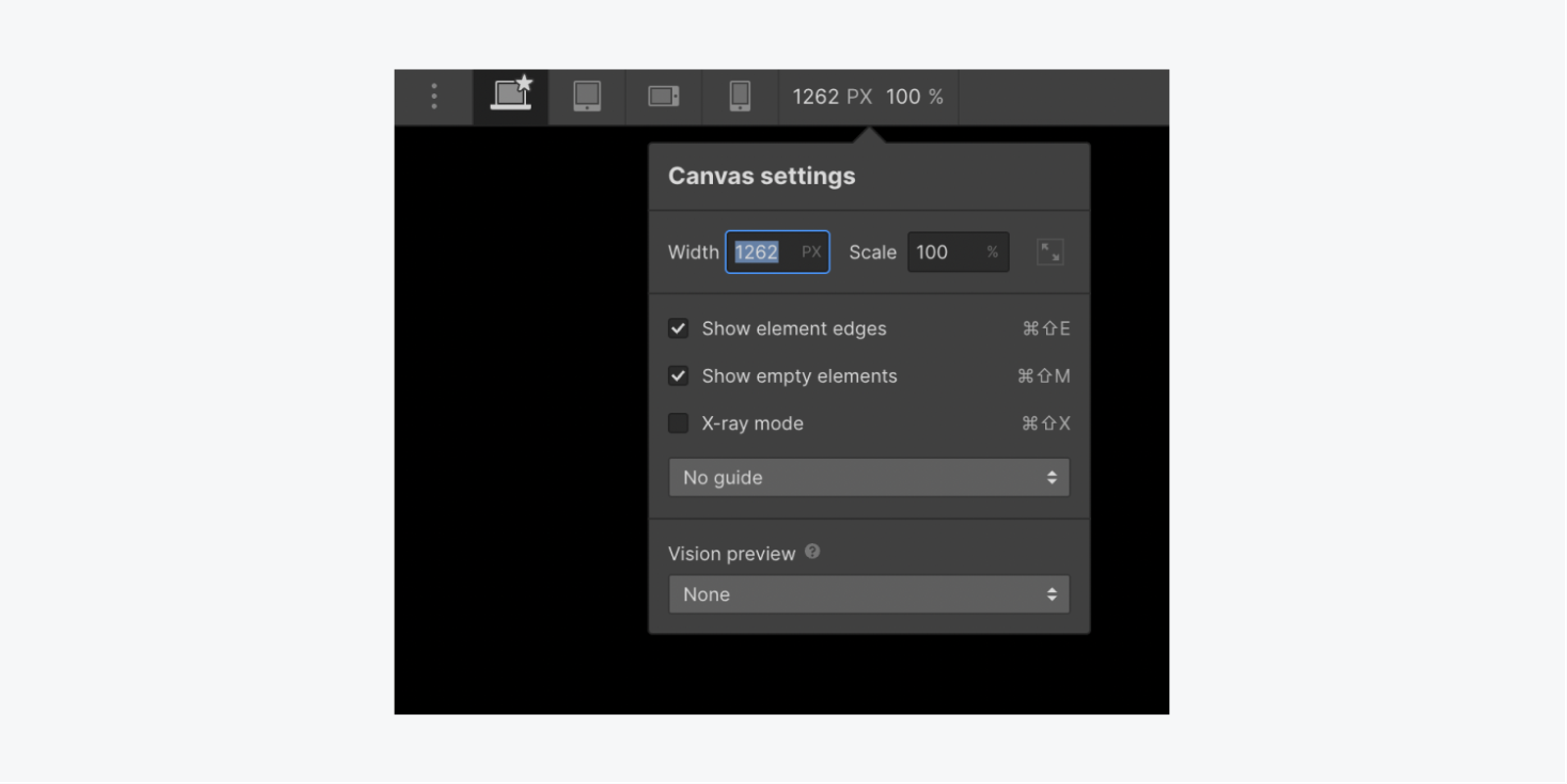
  • Override cascading styles for a specific breakpoint by changing values on that breakpoint. Breakpoints inherit styles from desktop (base) by default. You can override desktop styles, such as changing body background color on tablet breakpoint. Styles applied on tablet breakpoint cascade down to smaller breakpoints (mobile landscape and portrait) but not larger breakpoints (1280px and above).
Don't Overcomplicate Navigation

  • Navigation is a crucial element of any website, and it should be easy to use and understand. Avoid overcomplicating navigation by using too many links or confusing menus.

Ignoring web accessibility

  • Web accessibility refers to designing websites that are usable by people with disabilities.
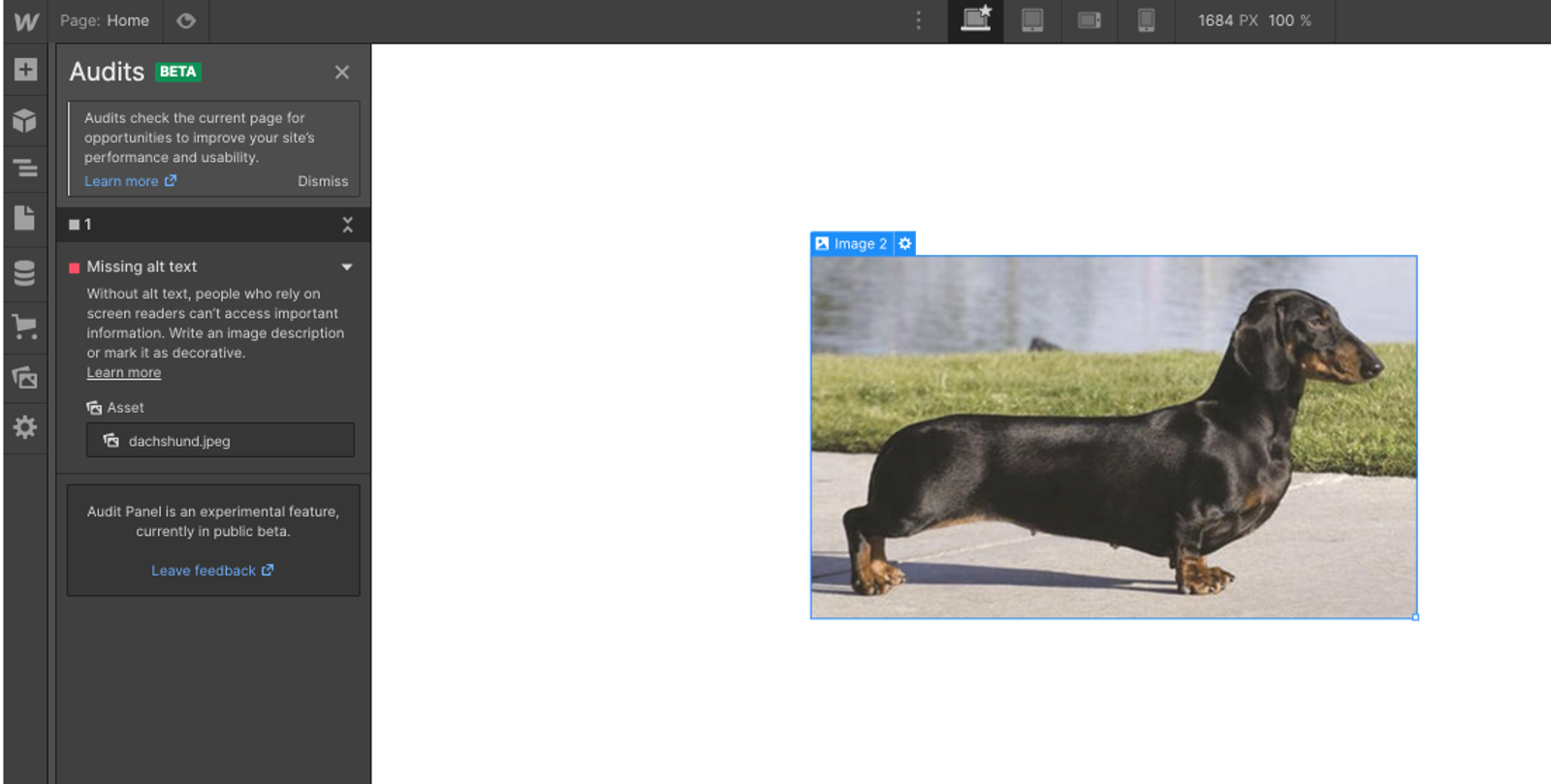
  • Tips for designing accessible websites on Webflow include using proper alt text for images and ensuring that the website can be navigated using a keyboard.
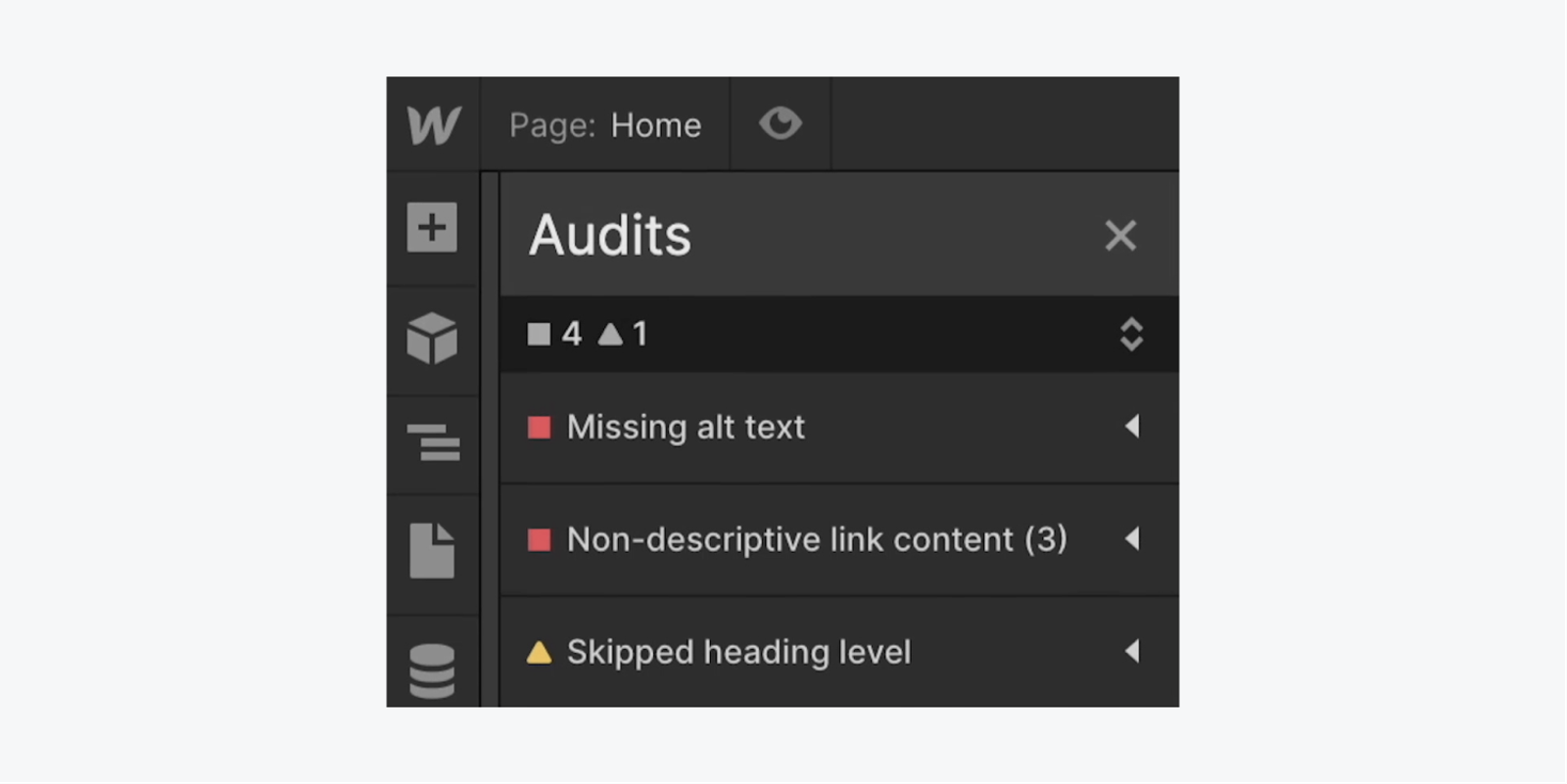
Press Alt/Option + U on your keyboard to quickly expand or collapse all items in the Audit panel.

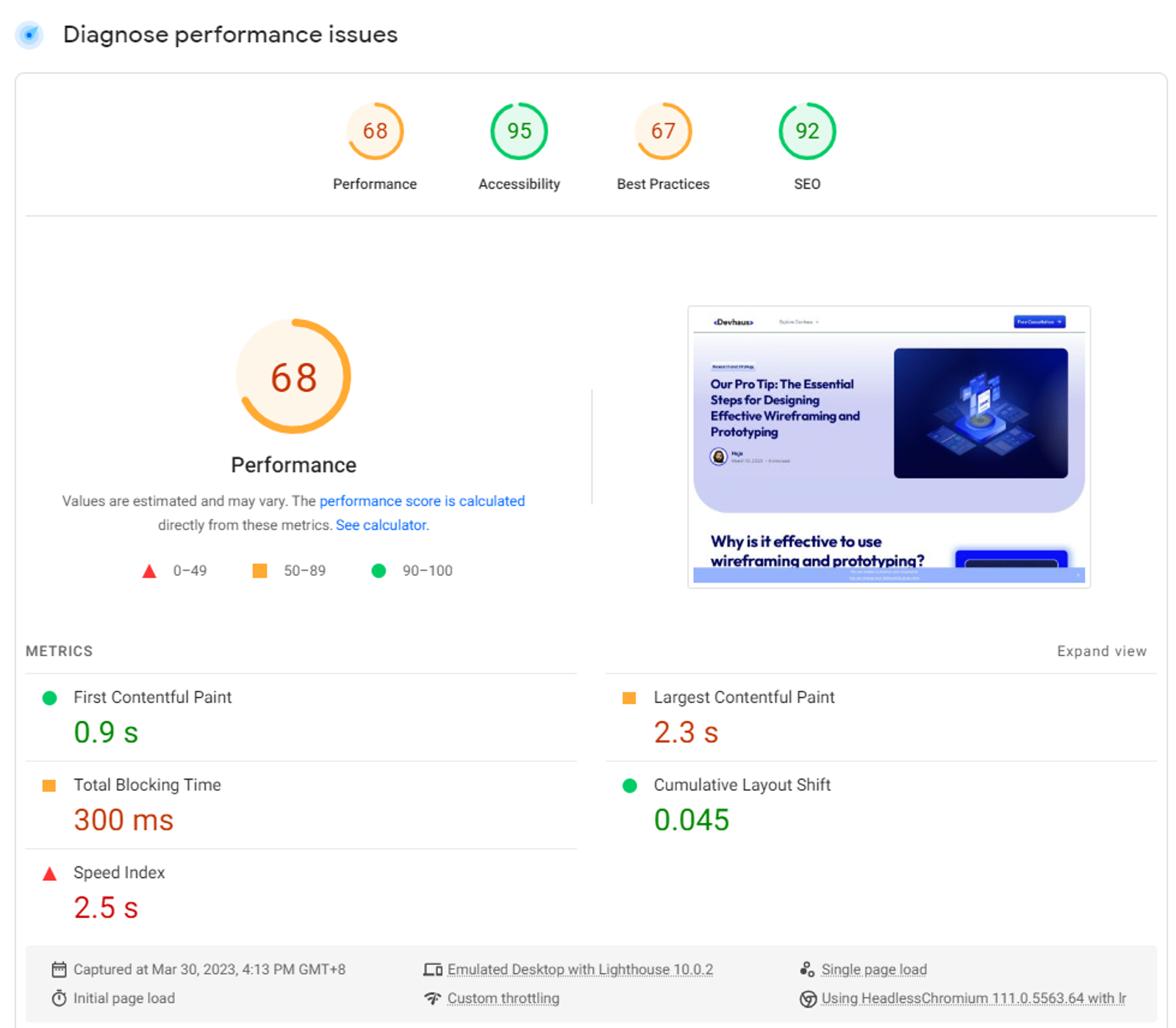
Forgetting about website speed

  • A slow website can negatively impact user experience and SEO.
  • Tips for optimizing website speed on Webflow include compressing images and and video files to reduce file size and improve loading times. Consider using a content delivery network (CDN) to speed up the delivery of your website's content to users.
Neglecting SEO

  • SEO (Search Engine Optimization) refers to designing a website in a way that makes it more likely to appear in search engine results.
  • Tips for designing SEO-friendly websites on Webflow include using descriptive URLs and meta tags, and optimizing website content for keywords.
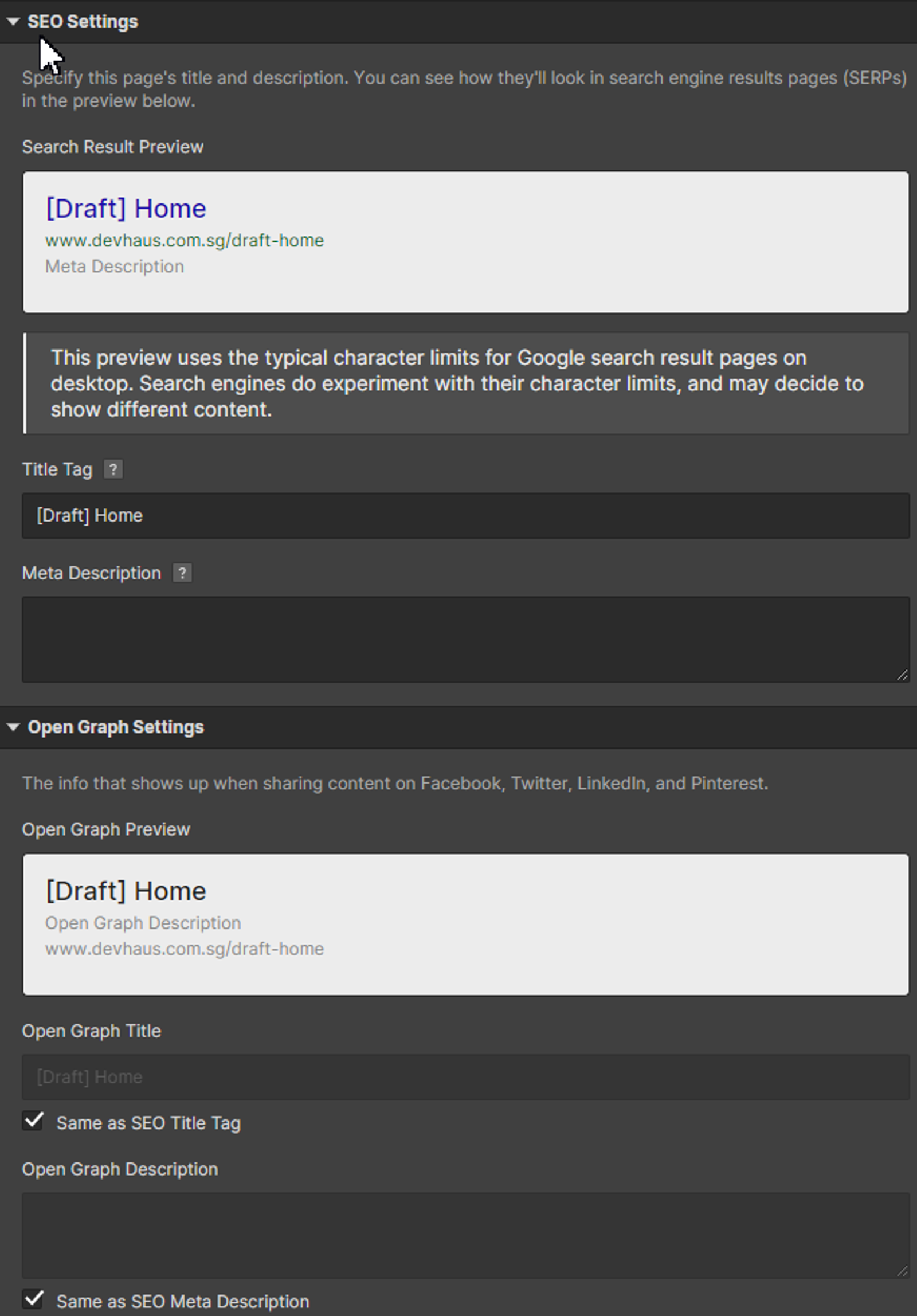
Optimize your SEO in the page setting

How to do It right

Pay attention to your target audience

  • Understanding your target audience is important in order to design a website that meets their needs and expectations.
  • Tips for designing websites that meet the needs of your target audience include conducting user research and creating user personas.

Focus on user experience

  • User experience refers to the overall experience a user has when interacting with a website.
  • Tips for designing websites with a good user experience include creating clear navigation, using white space effectively, and designing for readability.

Keep it simple and clean

  • A simple and clean design can make a website more visually appealing and easier to use.
  • Tips for designing clean and minimalistic websites on Webflow include using a limited color palette and avoiding cluttered layouts.

Use high-quality images and graphics

  • High-quality visuals can enhance the visual appeal and user experience of a website.
  • Tips for using images and graphics effectively on Webflow include optimizing image sizes and choosing images that are relevant to the content.

Conclusion

In conclusion, designing on Webflow requires attention to detail and consideration of best practices. By avoiding common pitfalls and following our tips for doing it right, you can create stunning and functional websites that meet the needs of your target audience.

Digital Transformation solutions

Up to 50% Subsidisies on your next implementation strategy with us

For Companies registered and operating in Singapore, with up at least 30% local shareholding - leverage on the Enterprise Development (EDG) grants for your next; Strategy, Implementation or Enablement project with us at Devhaus!

FAQ

Frequently Asked Questions

Here are some pointers, and a little - 'Quick bite-sized information'.

How do I know which engagement model is right for my business?

A: The choice depends on your current stage and specific needs:Alpha ($15K) - If you need to validate a new idea, conduct market research, or develop a go-to-market strategy before building anything

Beta ($25K+) - If you're ready to build an MVP, new website, or CMS with user-focused design and basic analytics
Gamma ($50K+) - If you have an existing system that needs growth acceleration, marketing automation, or enhanced analytics
Delta ($200K+) - If you're undertaking comprehensive digital transformation with legacy system modernization
Epsilon ($30K+) - If you have existing systems (preferably built by us) that need performance optimization and technical debt reductionNot sure? Book a free 30-minute consultation with Rohan (rohan@admiralsystems.io) to discuss your specific situation and get a tailored recommendation.

What's included in your pricing, and are there any hidden costs?

Our pricing is completely transparent with fixed-scope packages:

What's Included:
-
Dedicated team of 3-5 specialists per engagement
- All deliverables listed in the engagement model
- Comprehensive enablement documentation
- Project management and regular progress reports
- Up to the maximum man-hours specified (200-1,200 hours depending on engagement)

No Hidden Costs Policy:As long as your project stays within the agreed scope and timeline, there are no additional charges
- All potential add-ons are clearly listed upfront with fixed pricing
- For Singapore companies: EDG grants can cover 50-70% of costs (we handle the entire grant process)

When Additional Costs Apply:
-
Scope changes beyond the original engagement (requires new engagement purchase)
- Client-caused delays that exceed allocated man-hours
- Optional add-ons you specifically request

How long does each engagement take, and what if my project gets delayed?

Each engagement has a defined maximum timeline:
- Alpha: 2-8 weeks (200 hours)
- Beta: 8-12 weeks (280-500 hours)
- Gamma: 16-20 weeks (700 hours)
- Delta: 26-52 weeks (1,200 hours)
- Epsilon: 6-10 weeks (300 hours)

- Project Delays: We build buffer time into our estimates to account for normal client feedback cycles
( If delays are caused by our team, we absorb the additional costsIf delays are client-caused and exceed our allocated man-hours, additional charges may apply at our standard hourly ratesWe provide weekly progress reports so you always know where we stand) 

- Acceleration Options: Rush delivery available with 50% surcharge for urgent needs
We can often compress timelines by adding additional team members! If you have your own development team, we're more than happy to take it up to hi-fi prototyping so it'll be a ton less work for your Dev team!

Can you help us apply for Singapore government grants (for example - EDG/CTC grant)?

We can only guide you through it - having said that, we're experienced grant partners and handle the entire process:

Grant Coverage:
-
Singapore SMEs: Up to 50% of project costs covered
- Sustainability projects: Up to 70% coverage (until March 2026)
- Our services align with multiple EDG categories: Business Strategy Development, Financial Management, Human Capital Development, and Strategic Brand & Marketing Development

Our Grant Process:
Partner Network:
We work with Real Inbound Consulting (certified TR 43/SS 680) for grant administration
Full Service: Application preparation, document submission, project management, audit support, and claims processing
Administration Fees: $7,800-$15,000 depending on project size (much less than the grant savings)
Success Rate: High approval rate based on our experience with 50+ grant applications

Eligibility Requirements:
-
Singapore-registered company30%+ local equity held by citizens/PRs
- Financially stable to complete the project
- Project hasn't commenced before application

Timeline: Grant approval typically takes 4-6 weeks before project commencement.

What happens after my engagement is complete? Do you provide ongoing support?

We offer multiple post-engagement options:

Immediate Post-Completion:
-
30-day warranty period for any bugs or issues
- Complete handover documentation and training
- Knowledge transfer to your internal team

Ongoing Support Plans:

Starting from
Basic ($5K/year):
40 hours, bi-annual check-ins, basic troubleshooting
Advanced ($10K/year): 80 hours, quarterly check-ins, strategy sessions
Premium ($20K/year): 120 hours, monthly check-ins, dedicated account manager

Growth & Evolution:New Requirements: Purchase additional engagement models for new projects
System Expansion: Beta → Gamma → Delta progression path available
Continuous Optimization: Epsilon engagements for ongoing performance improvements
Key Principle: Support covers maintenance and optimization of existing systems, but new features or integrations require new engagement models to ensure proper scoping and quality.

What makes Admiral Systems different from other MarTech consultancies?

Key differentiators set us apart:
1. Asian Market Expertise:
-
First Webflow Enterprise partner in Asia
- Deep understanding of Singapore, Hong Kong, and Indonesian markets
- Multi-language, multi-currency, cross-border commerce experience

2. Comprehensive MarTech Integration:
-
Partners with 15+ best-in-class platforms (Segment, Customer.io, Fullstory, etc.)
- End-to-end data pipeline orchestration (not just point solutions)
- Unified dashboard approach preventing "tool sprawl"

3. Award-Winning Creative + Technical Team:
-
2024 Fullstory Service Partner Award winner (APAC)
- Design team that creates "jaw-dropping creatives" alongside technical implementation for your analytics
- Creative-technical convergence in every project